KantaLang now supports offline karaoke in the browser and on Android TV. Save the songbook, MIDI packs and timed lyrics before a session, choose a playback engine, and get future APK updates from inside Kanta TV 1.3.0.
Community is live too. You can share your own MIDI arrangements with timed lyrics, browse songs from other singers, and reserve them from the stage songbook. I've added those changes and a short demo to this post.
Open KantaLang or download the Android TV APK, version 1.3.0.
Watch the update
Download once, sing offline
Open Stage → Controls → Offline mode and playback. Under Offline Files, download the song catalogue, a SoundFont and the MIDI packs you want. The SoundFont supplies the instruments, and each MIDI pack downloads its matching timed lyrics too.
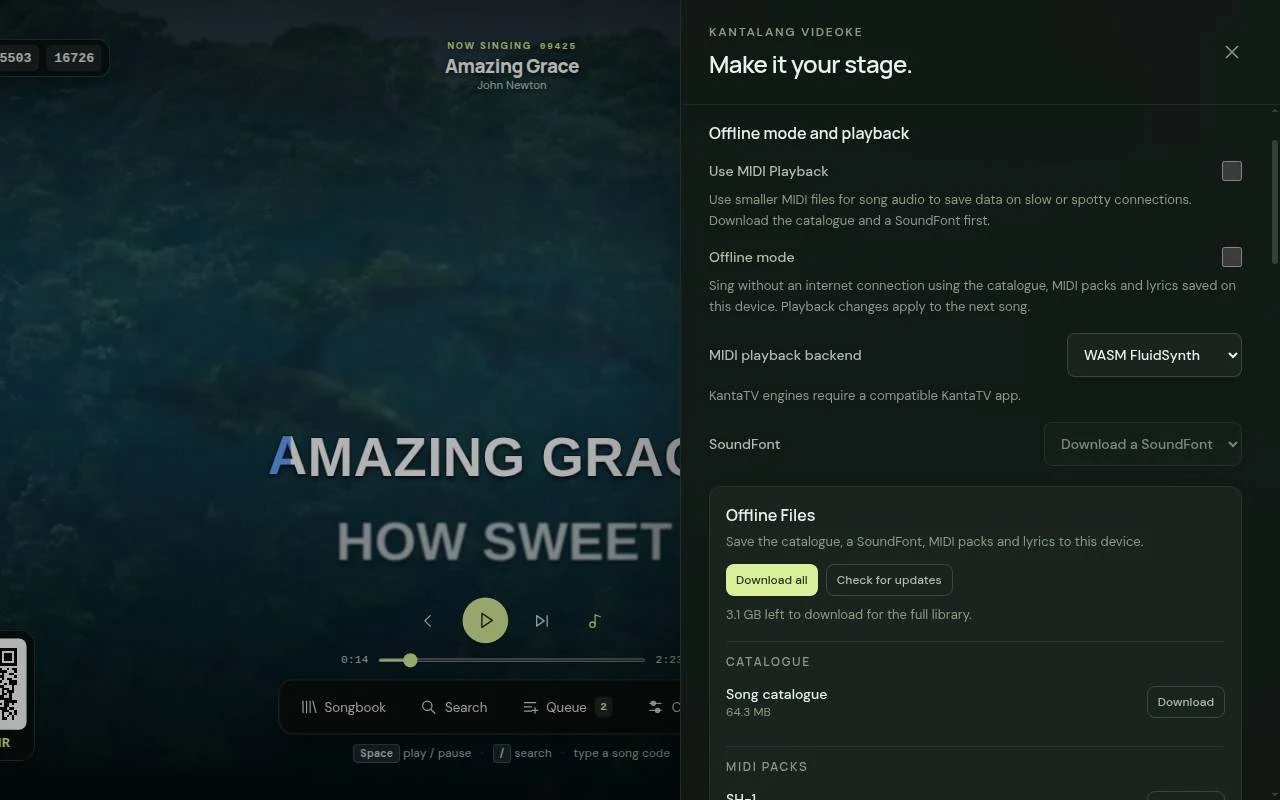
Download all saves the whole set and skips files you already have at the current version. If you cancel, run it again to download the remaining files. Downloads are checked before they replace an older copy.
Turn on Offline mode once the files are saved. Search reads the downloaded catalogue, and songs play from their saved packs. In the browser, let the app finish loading online at least once so it can save the interface and synthesizer. Kanta TV includes the interface for offline startup.
Already downloaded MIDI packs before this update? Use Add lyrics on a pack, or download its entry under Timed lyrics. You don't need to download the music again. These are the same timed lyrics used online, including their timing adjustments. If a song has no matching lyric document, the player uses lyrics embedded in its MIDI when available.
Use less data while online
Use MIDI Playback keeps the online songbook and lyrics, but makes the music on your device. Save the catalogue and a SoundFont first. KantaLang then reads a saved MIDI pack or fetches only the selected song's MIDI data.
This gives you another option when streaming audio struggles with the connection. The sound depends on the engine and SoundFont you select. Playback settings apply to the next song.
Native audio on Android TV
In the browser, FluidSynth runs through WebAssembly and plays MIDI with the SoundFont you've saved. It works with downloaded packs offline and with individual MIDI downloads online.
Kanta TV now offers KantaTV FluidSynth and KantaTV BASSMIDI alongside the browser's WASM FluidSynth engine. Both native engines support pause, seeking, volume and tempo changes.
Choose an engine in Offline mode and playback. Downloaded songs and timed lyrics stay on the TV for the next session.
More room for the lyrics
Opening the songbook, queue or controls now scales and shifts the stage to keep the lyrics visible beside the panel.
On Android TV, Controls → TV display size offers Compact, Standard and Large. You can also reach it with the remote's Menu button. Changing the size reloads the view and pauses playback, while keeping your downloads and preferences. Lyric size still has its own setting.
Kanta TV can check for updates
Version 1.3.0 checks for new APKs when online. Open Controls → App updates, or Menu → App updates on the remote, to check manually. Choose Download update, then Install update when you're ready. Android asks you to confirm the installation.
Update notices wait while a song is playing or buffering. Automatic checks stay off in Offline mode, and a fully downloaded update can be installed without a connection.
If you're on 1.2.0 or earlier, install the 1.3.0 APK over the existing app once to get the updater. Don't uninstall first, because that removes your saved files and settings. The APK is about 32 MB and needs Android 7.0 or newer.
Share and reserve Community songs
Community gives singers a place to share arrangements. Create an account, write a post, and attach a MIDI file with its timed LRC lyrics. KantaLang renders the upload into a playable MP3 with lyrics for the stage.
Browse the song feed, search by title or artist, and vote on songs. On the stage, Community has its own songbook section. Ready CM-2 songs appear by default. Turn on Include CM-1 songs in Songbook or Controls to see the other ready uploads. The setting is saved for your next visit.
Reserve a Community song to add it to the queue, or select Play to start it. These songs stream online and aren't included in the downloadable catalogue packs.
Other karaoke developers can use the Community integration guide to connect their own players.
The KantaLang project page has the app overview and download links.